
Deploying local MCP servers is the most critical infrastructure upgrade a development team can make in 2026. The Model Context Protocol (MCP) replaces legacy REST APIs by allowing autonomous AI agents to directly and securely interface with your local development environment, proprietary databases, and internal enterprise tools.
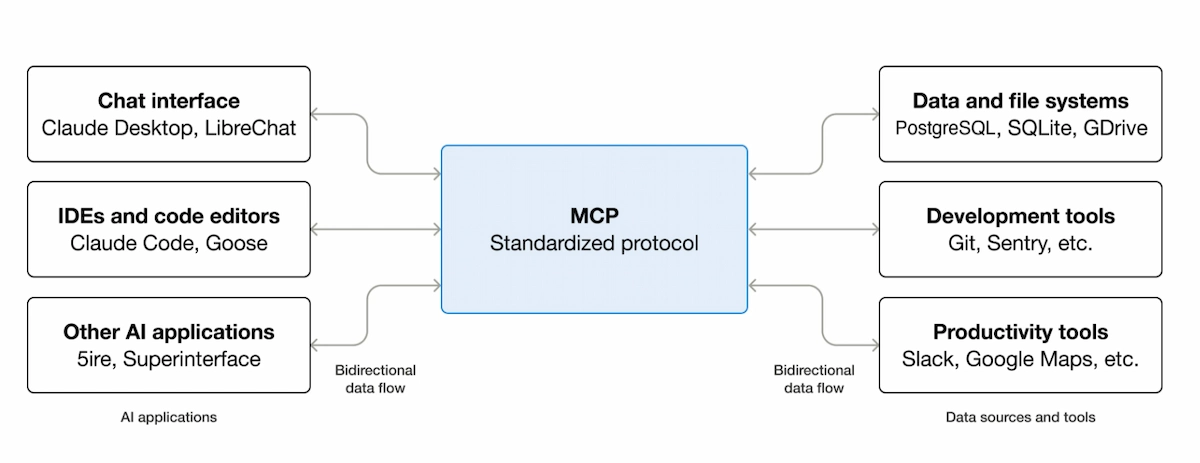
Instead of sending sensitive corporate data out to cloud models, MCP creates a standardized two-way bridge. The AI agent asks for specific context, and the local server securely delivers exactly what is needed.
This standard drastically reduces token costs, eliminates data leakage risks, and allows local models to execute complex, multi-step actions autonomously. For technical teams, deploying local MCP servers establishes a zero-trust architecture where AI only accesses explicitly authorized files. By standardizing the connection between intelligent clients and local data sources, developers can swap out underlying language models without rewriting any connection logic.
| Protocol / Standard | Primary Use Case | Data Security Risk | Latency Impact |
|---|---|---|---|
| Legacy REST APIs | Stateless web requests | High (Cloud Exposure) | High (Network Hops) |
| Local MCP Server | Agentic data retrieval | Low (Local Execution) | Near-Zero |
| A2A Protocols | Agent-to-Agent sync | Medium (Swarm logic) | Medium |
1. The Architecture Behind Deploying Local MCP Servers
When configuring this protocol, you are essentially setting up a dedicated context broker. An AI agent (the client) connects to the server, and the server translates the agent’s requests into specific system commands. This architecture allows tools like Claude Code and Cursor to navigate large codebases efficiently. The agent does not read every file; it queries the MCP server for the specific functions it needs to inspect.
MCP operates primarily over stdio (standard input/output) for local desktop clients or Server-Sent Events (SSE) for remote integrations. This dual-transport design means you can run an MCP server on a MacBook for local development or deploy it to a cloud cluster for enterprise production.
2. Initializing the Development Environment
Before launching your first server, ensure your local environment is configured to handle the transport channels that MCP relies on. Most enterprise deployments utilize Node.js or Python to initialize the server process. You must install the official SDK packages directly from the package manager to prevent dependency conflicts.
Download the complete JSON workflow template and Python server initialization scripts for this tutorial in our in our free Insider Hub.
3. Code Execution: Deploying Local MCP Servers via Python
To execute the deployment, you must initialize the server and define the specific tools it exposes to the AI client. Here is the foundational Python CLI command required to boot a standard MCP server locally:
python -m mcp_server --transport stdio --tools "database_read, file_search"This specific command binds the server to your standard output and immediately authorizes the database_read and file_search functions.
If an AI client attempts to execute a function outside of this strictly defined list, the MCP server rejects the request natively.
Security remains the primary reason teams are adopting this standard. You must explicitly define which tools the agent is allowed to execute. Never grant write access to production databases via a local agent protocol without implementing strict human-in-the-loop approval gates in the configuration file.
For teams using automation platforms, configuring MCP alongside n8n or Make.com creates a highly secure, offline data pipeline. These tools connect natively to MCP endpoints, allowing you to build internal AI agents that read local files and trigger webhooks without exposing your internal file structure to the public internet.
5. Scaling and Production Readiness
Moving from a local desktop experiment to a production environment requires structural network changes. Before deploying local MCP servers to a live DigitalOcean droplet or AWS instance, you must configure TLS encryption and secure WebSocket (WSS) connections to encrypt the payload.
Standard stdio transport only works when the AI client and the MCP server reside on the exact same physical machine. For remote production, developers must switch the transport layer to SSE. This allows an AI agent running in a cloud interface to securely query a private database housed strictly inside your internal corporate network.
6. Measuring Token Efficiency and API Costs
The financial benefit of deploying local MCP servers becomes obvious within the first week of operation. Standard prompt engineering requires developers to paste entire documents into the context window. MCP allows the agent to fetch only the specific paragraphs or SQL rows required to answer the prompt.
This precision reduces context window bloat by up to 90%. When querying massive enterprise datasets, this architecture translates directly to significantly lower API billing from providers like OpenAI and Anthropic.
7. Integrating with Local LLMs (Ollama)
The ultimate privacy architecture pairs an MCP server with a fully local large language model. By deploying local MCP servers alongside Ollama, developers achieve a 100% offline, autonomous AI agent. The local model acts as the reasoning engine, while the MCP server acts as the hands and eyes, querying local SQL databases and reading log files without a single byte of data leaving your machine.
Explore More on The NexGen AI
- Latest Updates: Browse our latest coverage on artificial intelligence breakthroughs
- Automation Guides: Claude Computer Use: 5 Powerful and Shocking Automation Features
External Open Source Resources
- Model Context Protocol: Official MCP Documentation
- Anthropic Developers: Building with Claude and MCP
- Python Package Index: MCP Python SDK Repository